






Remote Session guide
Guide to Initiating a Remote Session
Prometheus IT uses a secure, open-source solution for all Remote Session services. The device owner maintains full control at all times - the remote session can be terminated at any moment, the Remote Session app is portable and doesn't require to be installed, in most cases. When a Remote Session is ended, or terminated by the device owner, it doesn't leave any residual files or components. Our Remote Session solution is secure, allows only one connection at a time, and ensures that the device owner can terminate access whenever desired.
Portable initiation.
Prometheus IT uses RustDesk app for a secure and reliable remote desktop experience.
1. Click the button below to download the RustDesk app.
2. Run the app by double clicking the downloaded file.
3. Provide our specialist with the ID and the One-time password.
4. At this moment our specialist will initiate a Remote Session.
5. Now you can sit back and observe.
What if installation is required.
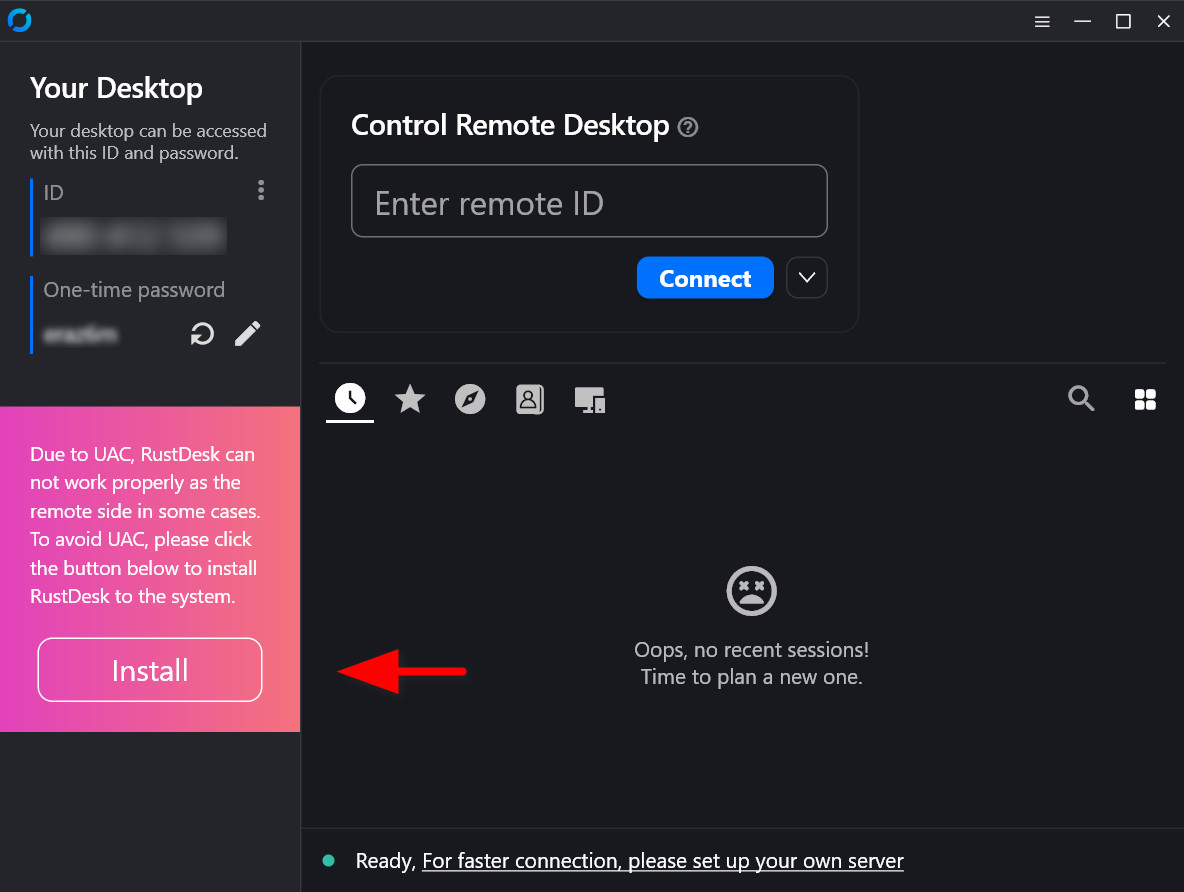
Due to UAC, RustDesk can not work properly as the remote side in some cases. To avoid UAC, please click the button located right underneath the One-time password after running the app to install RustDesk to the system.
> Refer to visual hint.
1. Duble click the app to install RustDesk to the system.
2. Do not change any initial settings unless you have to.
3. Follow the installtion isntructions.
4. Provide our specialist with the ID and the One-time password.
5. At this moment our specialist will initiate a Remote Session.
6. Now you can sit back and observe.
To learn more about RustDesk please visit its official website.